
Blogger does not have any option to add elements in the top of blog (navigation bar).
You can only add gadgets & elements in the sidebar.
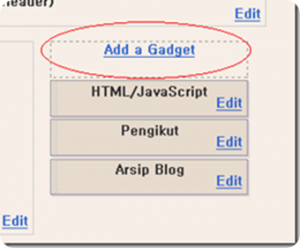
But the above problem can be solved by
a simple snippet of HTML code.
Follow these simple steps :
1. Go to layout —-> edit html. Then click expand widget template.
2. Now find the following code using ctrl+F or manually :
3. Now change the following in the first 5 lines of the above code :
maxwidgets=’2′
showaddelement=’yes’
so that the the whole code will now look as :
4. Now just before closing the code with , add the following:
#header ul li {
display:inline;
padding: 0 5px;
}
5. Its nearly done now. Go to layout —> add page element. You will now see that you can add a page element above your header. Isn’t that great.
Now if you want to add pages just like wordpress then select “add link list” in the header & add your post page’s link which you can easily get from “edit post” option in the mainpage of blogger.
If you want to know how to create pages in blogger, then click here.


Article By The Guy behind Vast9
The guy behind Vast9 is the real deal. He created this blog years ago when no one really knew anything about online marketing and helped hundreds of people succeed online. Eventually, he abandoned this blog because he started making a lot more money through other bigger projects. Peace.
Join My Awesome Newsletter !!
Get all the tips, tricks and suggestions directly to your inbox and thats too for free..!!
{ 1 comment… read it below or add one }
hey whats up with your code on your post your missing some data, you better check it out, looks bad on your part.