
If you are into serious blogging, the first thing to make your blog look professional is to have a favicon for your blog. It will add many benefits to your blog. The blog will look descent, genuine & of course, cool !! 🙂 .

What is a Favicon ?
Some of you may be wondering, what exactly is a favicon. Favicons are small logos or icons that appear in your browser on the location bar or address bar where the title of the webpage is written. Check the image below of my blog’s favicon for instance :
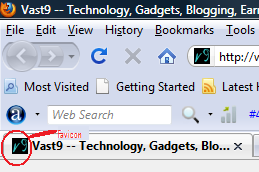
Now you might have got what is a favicon.
How to create a Favicon for a WordPress blog?
In order to create a favicon for your self hosted WordPress blog , you will need to follow the following steps :
1. Create an image (in paint or photoshop) that is in the ratio 1:1 & save it to your hard drive.
2. Now visit here & upload the image, that you created in step 1, & click ‘generate Favicon’ after choosing 16×16. It will generate a 16×16 .ico image file of your <b>favicon</b>. Download the generated file & save it with any name on your computer..
3. Upload the file where you have hosted your currently active WordPress theme. The path must be something like /blog-path/wp-content/themes/current-theme/favicon.ico. Upload another copy of this file to the main directory of your site (this will enable feedreaders to display your favicon).
4. Now go to Theme Editor from wordpress dashboard & edit the header.php file . Add the following below the <head> tag :
<link rel=”shortcut icon” href=”<?php bloginfo(‘stylesheet_directory’); ?>/favicon.ico” />
5. Save it & its done now. Now you will be able to see your favicon on your browser’s address bar , whenever you will visit your blog.
How to create a Favicon for a Blogspot blog ?
If you have created a blog on blogspot, then follow following steps:
1. Create & save .ico image (See step 1 & 2 in wordpress case above)
2. You now have to create a post in blogspot & upload your .ico favicon image here. Don’t publish your post, just click preview & from the preview page, right click on the image & select ‘copy link location’. So now you have got the link to your favicon image hosted on your own blog.
3.Now go to Layout–>Edit HTML in your Blogger template. You do not need to check the “Expand widget templates” box.
4. Search for the </head> tag in your template using your browser’s search function & immediately above that, paste the following code :
<link rel=”icon” href=”http://yourblogname.blogspot.com/myicon.ico” type=”image/x-icon” />
<link rel=”shortcut icon” href=”http://yourblogname.blogspot.com/myicon.ico” type=”image/x-icon” />
Replace ‘http://yourblogname.blogspot.com/myicon.ico’ with the url you copied earlier. Then save your template. Now when you view your blog in your browser, you should see your favicon appear beside the web address and in the bookmarks folder (if you have bookmarked your site).
That’s it. You can see how easy it was to create a favicon for your blog.
Hope you liked the post. Do share your views & doubts in comments, If you are facing any trouble creating a favicon for your blog.


Article By The Guy behind Vast9
The guy behind Vast9 is the real deal. He created this blog years ago when no one really knew anything about online marketing and helped hundreds of people succeed online. Eventually, he abandoned this blog because he started making a lot more money through other bigger projects. Peace.
Join My Awesome Newsletter !!
Get all the tips, tricks and suggestions directly to your inbox and thats too for free..!!
{ 8 comments… read them below or add one }
Hey, I really wanted to create that small logo Thanks for this tutorial, its really easy, I see.
Thanks for dropping by.
Hey I just wanted to know if you knew of any good .icon editors or something to make my large image files into something I can use from this post (or does it automatically re size large images?)! Thanks in advance!
Ryan, If you visit the favicon site I mentioned; It will automatically resize your large image into smaller icon sized .ico image. All you need to care is that your larger image should be in the ratio 1:1 , i.e, square shaped.
check this one http://graphicriver.net/item/favicon-generator-action/741740
hope will help
Thanks for suggesting that !
Nice Tutorial. Well explained.
How much Time will it take the favicon to become live on the wordpress site?
nice idea aobut this nice favicon and easy too