
As you all know, Facebook has grown into the biggest social network over the years. It has nearly 600 million users. If you have a blog, it will definately help you to promote it through facebook. It can really help to drive targetted users to your blog, if done skillfully. The best start will be to create a facebook fan page for your blog. A facebook fan page will help you get visitors, subscribers & also, if you got good number of fans, it will help you drive advertisers to you site as they prefer blogs with good number of facebook fans & twitter followers.
So on the whole, just like a good pagerank is important for a blog, a facebook fan page with many fans is also important & essential for a blog. On the whole, a Facebook fan page depicts the reputation of a blog based on the number of fans & design.
How to create a facebook fan page for my blog ?
1. Login to your facebook account. You must have a facebook account if you want to create your facebook fan page. If you don’t have one (oh, in which world are you living then), you must register at facebook.
2. Now go to this link . You will see some categories as shown in the picture below :
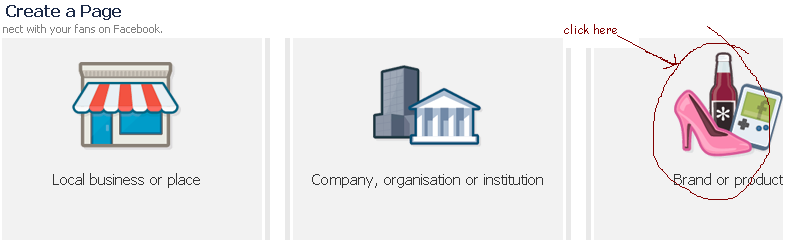
Click on ‘Brand or Product’.
3. Now you will be prompted to choose a subcategory & a name.
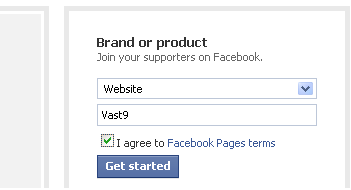
For subcategory, scroll down on the drop down menu and choose “Website”. On the next section, enter the name of your page. Here I have used the name of my blog blog, i.e. ‘vast9’.
4. Upload a photo to your Facebook Fan Page.
 Try to make a cool photo as your blog’s profile image on your facebook fan page as the profile image will be the first thing to attract new fans.
5. Add information about your blog’s Facebook fan page.
Click the “Info” tab and then “Edit Information” on the right.

Type in the relevant information including the date your blog was founded, the URL, and an overview. Try to provide more & more info about your blog as you can.
6. Write a catchy caption about your blog.
Click the link under your profile image that says ‘write something about ‘yourBlogName’. Now add an short attractive caption here, which describes what is your page all about & why one should become a fan of it. This will really play a great role in increasing your Facebook fans.
7. Final step
Finally remember to become a fan of your newly created facebook fan page of your blog by clicking the ‘Like’ button . Now try to suggest your page to as many of your friends as possible. Once you get 25+ facebook fans of your blog, you can get a vanity url of your page by clicking here. A vanity url will be of the type facebook.com/yourBlogName.
Hope you have a great looking Facebook fan page of your blog like my blog’s page :
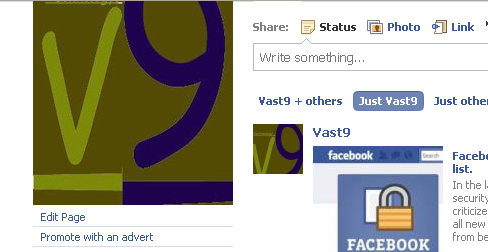
Hope you liked the tutorial. Also become a fan of Vast9 facebook’s fan page


Article By The Guy behind Vast9
The guy behind Vast9 is the real deal. He created this blog years ago when no one really knew anything about online marketing and helped hundreds of people succeed online. Eventually, he abandoned this blog because he started making a lot more money through other bigger projects. Peace.
Join My Awesome Newsletter !!
Get all the tips, tricks and suggestions directly to your inbox and thats too for free..!!
{ 11 comments… read them below or add one }
Thanks for explaining it full. I have started loving your blog.
Can you please tell, how should I add my blog’s RSS feeds to my page so that it is full of content.
Thanks for appreciating my work. You can add your blog’s feed through the notes application (thats provided within your facebook page) or using third party apps like RSS Graffiti. I will post a complete tutorial on that here in the coming days. Stay tuned.
Very useful post. thanks.
Thanks for dropping by. Keep visiting Vast9.
Thank you for sharing your stuff on blog.
Im not such an expert when it involves this. awesome scan, appreciate your bloging this.
This blog has lots excellent info on it, I visit it everyday. I had recommended this post to any or all of my facebook friends.
Thanks for appreciating, Keep up the good work.
This one is good. Clearly explained with pictures. I like the way you are explaining things.
Thanks for posting…very helpful!
Hello garish you have a very good blog here ,you have written a very good blog post ,I recently started blogging within a month ,looking for proper strategy and knowledge for blogging hope I can get proper knowledge of blogging through blog.