
Facebook is a cool place to interact with your friends and colleagues. Infact it is the best social media & its inbuilt chat feature is just awsum. Most of us do a lot of chatting through facebook. But through chat list anyone can see that you are online or not & anyone can then chat with you even if you don’t want to chat with him or her at that time. All knows that there is an option to go offline but that will make you appear offline for all not for any specific person or a group of them. So here is a little workaround that will help you create a list of your friends whom you don’t want to chat with or to whom you want to appear offline.
Just follow the following simple steps to become invisible for single person :
1. Login to your facebook account. Click on the ‘friends’ link on the left side.
2. At the upper-middle part of the page you will see edit friends. Click on that.
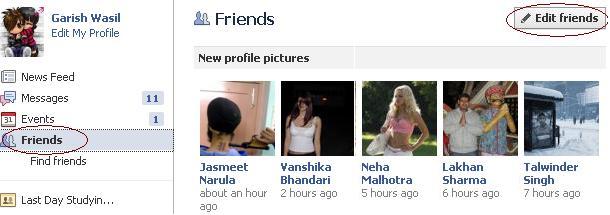
3. Then click on Create list. And add List name (in my example I have named it ‘invisible’) and any Friend that you want to be invisible.


4. Now go to your Facebook chat box. You will see a new list ‘invisible’ at the top of chat box. If you want to be invisible for the list of people you added in your list, then click on green button to go offline.
Thats it. Now the people you added in your list will see that you are offline.
Hope you liked the post.


Article By The Guy behind Vast9
The guy behind Vast9 is the real deal. He created this blog years ago when no one really knew anything about online marketing and helped hundreds of people succeed online. Eventually, he abandoned this blog because he started making a lot more money through other bigger projects. Peace.
Join My Awesome Newsletter !!
Get all the tips, tricks and suggestions directly to your inbox and thats too for free..!!
{ 6 comments… read them below or add one }
Hey, great tutorial. Thanks, I really, really wanted that.
Its all right. Keep visiting vast9.
Where did you find that method. Thanks anyway, I have subscribed your blog. Hope I will get such good articles from you.
Thanks alex for dropping by & subscribing. You will always get such useful articles from vast9.
Very Nice post.Keep writing more.
Thanks for dropping by.